
.png)

%20(1).png)
Digital Transformation | BIM | Product Updates
Autodesk Forma + Revit Interoperability: Bridging Feasibility and Detailed Design with Connected Client
Discover Autodesk Forma–Revit interoperability in 2025. Learn how the Forma Connected Client workflow brings wind analysis, contextual site data, and cloud proposals into Revit to reduce rework between feasibility and detailed design.
-1.png?width=40&name=Empowering%20Transformation%20-%20logo%20transition%20animation%20(7)-1.png)
SolidCAD 19 Feb 2026
Early-stage feasibility work is supposed to make detailed design easier. In reality, it often creates a second job: exporting, rebuilding, and re-validating the same ideas inside Revit.
In 2025, Autodesk introduced a major step toward fixing that handoff: Revit becomes the first official Forma Connected Client, designed to connect Forma’s cloud-based context and analysis with Revit’s detailed design environment.
The outcome teams are chasing is simple: carry feasibility intent forward with fewer translation steps—so architects and engineers can move from “does this option work?” to “let’s develop it” with less rework risk.
What Autodesk Announced at AU 2025: Revit as a Forma Connected Client
Autodesk’s AEC team describes Revit’s new role as a “Forma Connected Client” as a bridge between cloud and desktop workflows, enabling Revit users to access Forma capabilities—without relying on repeated export/import cycles.
Autodesk’s construction blog also highlights the same directional shift: Revit becomes the first Forma Connected Client to enable access to Forma’s cloud capabilities directly from the desktop.
What This Unlocks for Architects and Engineers
1) Wind analysis access inside Revit (via Forma cloud capabilities)
A key capability Autodesk has highlighted is access to Forma’s cloud-powered analysis—commonly referenced through examples like wind analysis available to Revit users as part of this Connected Client direction.
This matters because wind-related decisions (massing placement, podium/tower relationships, canopies, setbacks) are much cheaper to address while options are still fluid.
2) Contextual site data and ordered context available in Revit
Autodesk explicitly calls out that contextual data ordered in Forma will be available in Revit—reducing the need to re-order context again downstream.
This helps feasibility inputs (context, assumptions, surroundings) stay connected to the Revit model environment where design development happens.
3) A more continuous workflow between feasibility and BIM
Autodesk frames Forma Connected Clients as a longer-term shift toward shared, granular data and cloud capabilities across existing desktop tools.
Translation: fewer “handoff cliffs” between concept and documentation.
How Forma–Revit Interoperability Works (Workflow Overview)
Autodesk has published a curated set of Forma–Revit interoperability tutorials that show the practical workflow: send a proposal to Revit, update it back to Forma, and compare versions.
Step 1: Send a Forma proposal to Revit
Autodesk’s tutorial walks through sending a selected Forma proposal to Revit using the Revit integration option (Send to Revit).
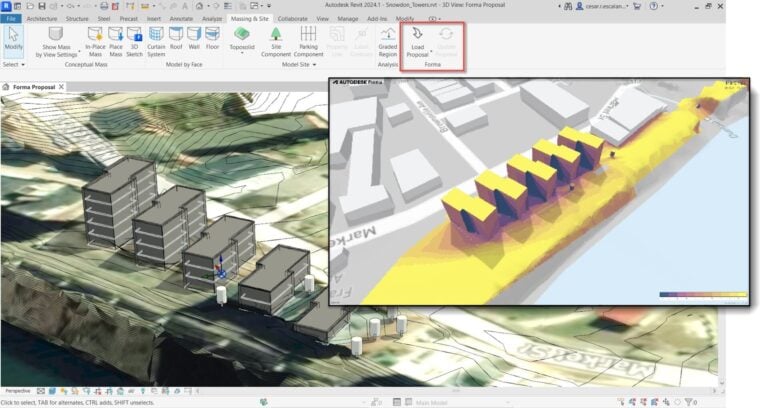
Step 2: Load the proposal in Revit (Massing & Site → Forma)
In Revit, the interoperability workflow is designed around the Massing & Site tab and the Forma tools (for example, “Load Proposal”), which Autodesk documents across its training resources.
Step 3: Update the Revit design back to Forma
Autodesk also documents the reverse direction: in Revit, go to Massing & Site → Forma → Update Proposal to send updates back to Forma.
Step 4: Compare versions and analysis results
Autodesk’s “Compare Revit and Forma designs” tutorial highlights comparing different versions and analysis results in Forma.
Practical Use Cases Where This Pays Off
Urban infill and high-density massing studies
- Test wind impacts and comfort earlier for different options.
- Transition selected options to Revit without treating feasibility as “throwaway work.”
Campus, institutional, and healthcare planning
- Maintain contextual and planning intent as projects move from optioning into coordinated design development.
Developer-led programs that must survive the shift into BIM delivery
- Reduce the concept-to-BIM translation burden by keeping feasibility data and updates connected across tools.
What to Watch Out For (So “Connected” Doesn’t Become “Confusing”)
Interoperability works best when teams apply light governance:
- Decision gates: define which proposal/version is the baseline before developing in Revit.
- Coordination rules: decide when updates go back to Forma vs. staying in Revit.
- Clarity on assumptions: environmental analysis is powerful, but results depend on inputs and modeling choices—teams should document assumptions alongside decisions.
How SolidCAD Helps Teams Adopt Forma–Revit Interoperability with Confidence
The technology is only half the story. The real value comes from making the workflow repeatable across projects and teams.
SolidCAD helps by:
- Defining the feasibility-to-Revit workflow (roles, decision gates, versioning)
- Setting up standards that prevent coordinate and context drift
- Training architects, engineers, and BIM/VDC leads so adoption sticks
- Supporting a pilot project and scaling the approach once it proves value
Final Takeaway: Better Continuity from Feasibility to Detailed Design
Autodesk’s Forma Connected Client initiative is fundamentally about continuity—keeping context, analysis, and design intent closer to the Revit workflow where design development lives.
For teams under pressure to move faster without sacrificing confidence, Forma–Revit interoperability is a practical way to reduce friction between early optioning and detailed BIM work—without pretending it replaces good process.
Ready to Connect Forma and Revit in Your Practice?
Feasibility-to-Revit continuity doesn’t happen automatically — it needs a workflow your team can repeat, with clear decision gates, standards, and ownership.
Book a Forma + Revit interoperability assessment with SolidCAD to:
- Validate where Connected Client fits your current process
- Define a pilot workflow (options, versioning, update rules, coordinates)
- Train the right roles so adoption sticks
- Reduce rework risk between early design and detailed Revit delivery
Unlock expert insights: connect with SolidCAD today!
Discover how SolidCAD Insights can accelerate your business growth and transformation. From industry trends to practical strategies, our experts are here to help. Contact us today to discuss your needs and explore solutions tailored to your business.
%20(3).png)