Ask Revit to draw four walls, cut a doorway, and pitch a roof — in plain English — and watch it happen in the model. That's not a demo reel. It's what happens when you connect Claude to Revit using Model Context Protocol (MCP), and it's a lot closer to production-ready than most AEC teams realize.
We've published a free, hands-on technical guide that shows exactly how to do it — from an empty folder to a working AI-driven Revit add-in. No black box, no vendor magic. Just the architecture, the code, and a small building to prove it works.
What Is Model Context Protocol (MCP), and Why Should AEC Teams Care?
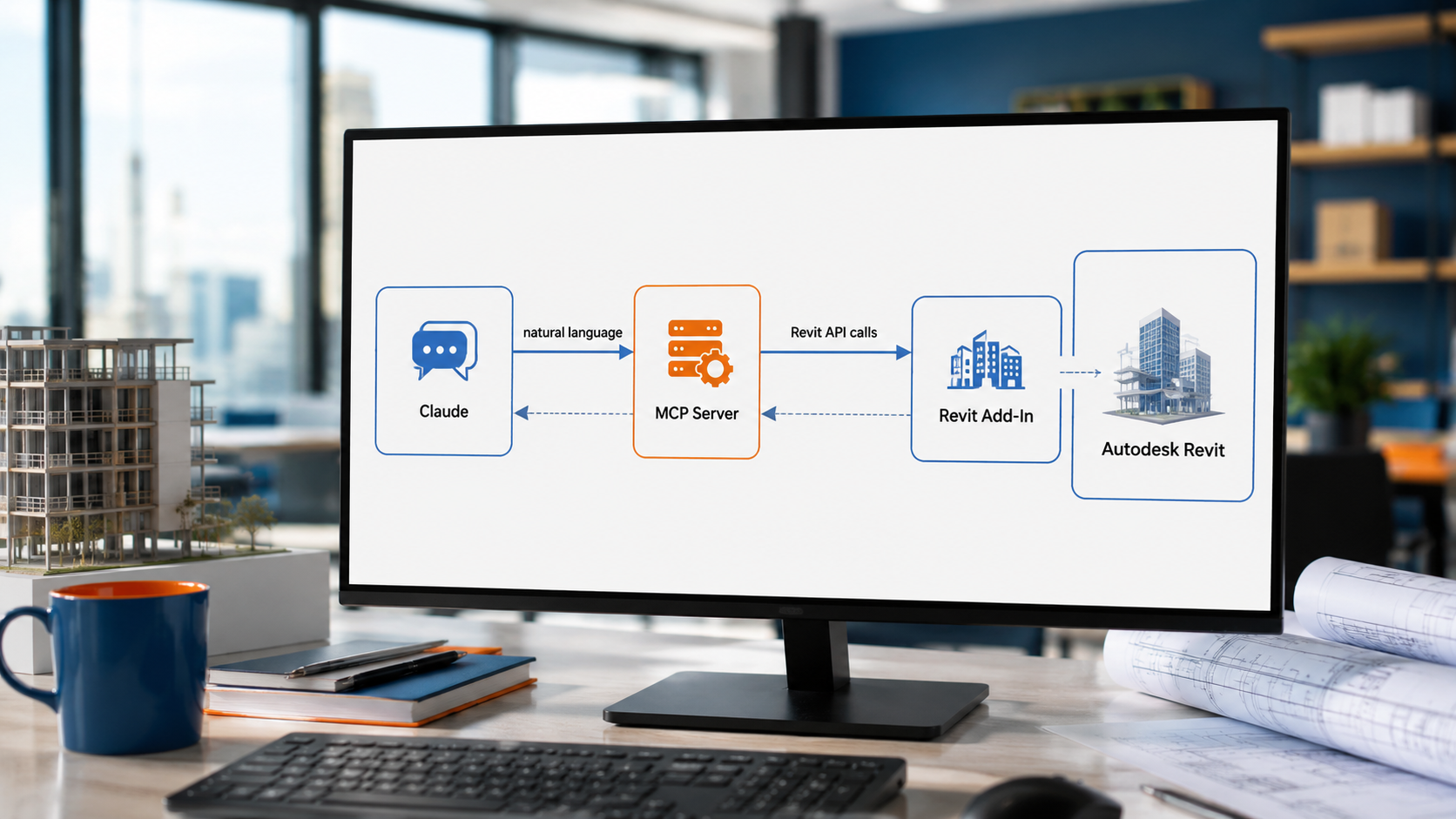
Model Context Protocol (MCP) is an open standard that lets AI models like Claude call external tools and systems directly — instead of just generating text, Claude can trigger real actions inside real software. For Revit users, that means natural-language requests ("place a door here," "raise this roof to a 45-degree pitch") can be translated into actual Revit API calls, executed inside a live model.
This isn't about replacing BIM expertise. It's about collapsing the distance between intent and execution — turning routine, repetitive modeling tasks into a conversation, so your team's time goes toward design decisions instead of manual input.
From Zero to Dollhouse: Building Your First Revit MCP Add-In
Our latest technical resource, From Zero to Dollhouse: Building Your First AI-Driven Revit Add-In with MCP, walks through the full architecture behind a working Claude-to-Revit integration — an MCP server, a named-pipe communication layer, and a Revit 2027 add-in — built entirely from scratch.
Rather than a toy example, the guide uses a deliberately simple but complete build: a small "dollhouse" model that touches every core concept in the Revit element hierarchy.
By the end, you'll have built a natural-language pipeline that creates:
- Four walls forming a closed structure (a self-hosted Revit element)
- A hosted door and two hosted windows (family instances that depend on their host wall)
- A 45-degree pitched roof (a sketch-based element built from a boundary polygon)
Each step feeds the next — wall IDs become door and window hosts, wall corners become the roof footprint — so you come away understanding the model as connected data, not a list of isolated commands. Once you've built the dollhouse, you've effectively built the pattern behind every one of the roughly 600 tools in SolidCAD's full production Revit MCP integration.
Who This Guide Is For
This is a technical, code-forward resource written for people who will actually sit down and build it:
- BIM managers and computational design leads evaluating AI-driven workflows for their firm
- .NET developers working inside AEC or manufacturing environments
- Revit API developers exploring what's possible with MCP and large language models
- Technology leaders scoping what an AI-assisted modeling pipeline could look like in-house
If your team is responsible for BIM standards, automation, or Revit customization, this is the clearest starting point available today.
Get the Full Technical Walkthrough
The complete guide — including full C# code samples, the MCP server setup, the Revit add-in architecture, and the four-step dollhouse build — is available now as a free download.
Once you've seen how far ten tools can take you, our team is happy to talk through what a full production integration looks like for your environment — including the broader toolset SolidCAD has already built for batch modeling, MEP routing, model-health auditing, and sheet automation across Revit.
Talk to SolidCAD about AI-Driven Revit Integration
FAQ
What is Revit MCP?
Revit MCP is an integration that connects an AI model like Claude to Autodesk Revit using Model Context Protocol (MCP), an open standard that lets AI call external tools directly. It allows natural-language requests to be translated into real Revit API calls executed inside a live model.
How do you connect Claude to Revit?
You connect Claude to Revit by building an MCP server that exposes Revit API functions as tools, a communication layer (such as a named pipe) between the server and Revit, and a Revit add-in that executes the commands. SolidCAD's free tutorial walks through the full architecture step by step.
What is Model Context Protocol (MCP)?
Model Context Protocol is an open standard that lets AI models call external tools and systems directly, rather than only generating text. It enables an AI like Claude to trigger real actions inside software such as Revit.
Do I need coding experience to build a Revit MCP integration?
Yes. This is a technical, code-forward tutorial aimed at .NET developers, Revit API developers, and computational design leads. It includes full C# code samples for building the MCP server and Revit add-in.
Can Revit MCP be used in production?
Yes. The tutorial builds a simple "dollhouse" model to teach the core pattern, which is the same pattern behind SolidCAD's full production Revit MCP integration of roughly 600 tools covering batch modeling, MEP routing, model-health auditing, and sheet automation.
Which Revit version does the tutorial use?
The tutorial builds the add-in for Revit 2027, though the underlying MCP architecture and patterns apply broadly across Revit API development.

.png)

%20(1).png)
-1.png?width=40&name=Empowering%20Transformation%20-%20logo%20transition%20animation%20(7)-1.png)
%20(3).png)